[BoostCamp AI Tech / Pre-Course 1] Python Object-Oriented Programming(OOP)
네이버 부스트코스의 Pre-course 강의를 기반으로 작성한 포스트입니다.
객체는 실생활에서의 물건으로 비유할 수 있으며 속성(attribute)와 행동(Action)을 가진다.
Object-Oriented Programming(OOP)는 이러한 객체 개념을 프로그램으로 표현하고자 하는 프로그래밍 기법이다. 속성은 변수(variable), 행동은 함수(method)로 표현된다.
현재는 대부분의 언어들이 객체지향 형태를 차용하고 있고, Python도 그 중 하나이다.
ex. 인공지능 축구 프로그램을 작성한다고 가정하자
- 객체 종류: 팀, 선수, 심판 공
- Action
- 선수: 공을 차다, 패스하다
- 심판: 휘슬을 불다, 경고를 주다
- Attribute
- 선수: 선수 이름, 포지션, 소속팀
- 팀: 팀 이름, 팀 연고지, 팀소속 선수
OOP는 설계도에 해당하는 클래스(class)와 실제 구현체인 인스턴스(instance)로 나눈다.
ex. 붕어빵틀은 Class에 붕어빵을 인스턴스에 비유할 수 있다.
Class
1
2
3
4
5
6
7
8
9
class SoccerPlayer(object):
    def __init__(self, name, position, back_number):
        self.name = name
        self.position = position
        self.back_number = back_number

    def change_back_number(self, new_number):
        print("선수의 등번호를 변경합니다 : From %d to %d", %(self.back_number, new_number))
        self.back_number = new_number
class 선언하기
class: class 예약어SoccerPlayer: class 이름object: 상속받는 객체명(안 적어도 파이썬에서는 자동 상속이 일어남)
Class명은 CamelCase를 사용하여 변수와 함수명은 snake_case를 사용한다.
Attribute 추가하기
__init__, self와 함께 사용한다. 이 중 __init__은 객체를 초기화하는 예약함수이다.
1
2
3
4
5
6
7
8
9
10
11
12
13
14
15
16
17
18
19
20
21
class SoccerPlayer(object):
    def __init__(self, name, position, back_number):
        self.name = name
        self.position = position
        self.back_number = back_number

    def __str__(self):
    return "Hello, My name is %s. I play in %s in center " % \
    (self.name, self.position)

    def __add__(self, other):
        return self.name + other.name

jinhyun = SoccerPlayer("Jinhyun", "MF", 10)
park = SoccerPlayer("park", "WF", 13)

print(jinhyun)
# "Hello, My name is Jinhyun. I play in MF in center"

print(jinhyun + park)
# Jinhyunpark
Python에서 __는 특수한 예약함수나 변수, 그리고 함수명 변경(맨글링)으로 사용된다. 맨글링은 소스 코드에 있는 함수명, 변수명 등을 컴파일러가 일정한 규칙을 가지고 변경하는 것을 의미한다.
참고: 파이썬(python) - Magic Method
Method 구현하기
- method(Action) 추가는 기존 함수와 같으나, 반드시
self를 추가해야만 class 함수로 인정된다.self는 생성된 인스턴스 자신을 의미한다.
1
2
3
4
class SoccerPlayer(object):
    def change_back_number(self, new_number):   # self 추가
        print("선수의 등번호를 변경합니다 : From %d to %d", %(self.back_number, new_number))
        self.back_number = new_number
Object(instance) 사용하기
- Object 이름 선언과 함께 초기값 입력한다.
1
2
3
4
5
jinhyun = SoccerPlayer("Jinhyun", "MF", 10) # 객체 선언
print(jinhyun.back_number)
# 10

jinhyun.change_back_number(5)
OOP characteristics
- Inheritance
- Polymorphism
- Visibility
Inheritance: 상속
- 부모 클래스로부터 attribute와 method를 물려받은 자식 클래스를 생성하는 것이다.
- 자식 클래스에서
super()를 사용해 부모 객체를 사용할 수 있다.
1
2
3
4
5
6
7
8
9
10
11
12
13
14
15
16
17
18
19
20
21
22
23
24
25
26
27
class Person(object):   # 부모 클래스 Person 선언
    def __init__(self, name, age, gender):
        self.name = name
        self.age = age
        self.gender = gender

    def about_me(self):    # Method 선언
        print("저의 이름은 ", self.name, "이구요, 제 나이는 ", str(self.age), "살 입니다.")

class Employee(Person):    # 부모 클래스 Person으로 부터 상속
    def __init__(self, name, age, gender, salary, hire_date):
        super.__init__(name, age, gender)   # 부모객체 사용
        self.salary = salary
        self.hire_date = hire_date   # 속성값 추가

    def do_worK(self):   # 새로운 메서드 추가
        print("열심히 일을 합니다.")

    def about_me(self):   # 부모 클래스 함수 재정의
        super().about_me()  # 부모 클래스 함수 사용
        print("제 급여는 ", self.salary, "원 이구요, 제 입사일은 ", self.hire_date, " 입니다.")

myEmployee = Employee("Daeho", 34, "Male", 300000, "2012/03/01")

print(myEmployee.about_me())
# 저의 이름은 Daeho이구요, 제 나이는 34살 입니다.
# 제 급여는 300000원 이구요, 제 입사일은 2012/03/01 입니다.
Polymorphism: 다형성
- 같은 이름 메소드의 내부 로직을 다르게 작성 - Overidding, Overloading 등의 개념과 연결된다.
- Dynamic Typing 특성으로 인해, python에서는 같은 부모 클래스의 상속에서 주로 발생한다.
- 다른 언어들과 달리, Python은 parameter 타입을 강제하지 않기 때문에 굳이 Overloading을 구현할 필요가 없다.

1
2
3
4
5
6
7
8
9
10
11
12
13
14
15
16
17
18
19
20
21
22
23
24
25
class Animal:
    def __init__(self, name):   # Constructor of the class
        self.name = name

    def talk(self):    # Abstract method, defined by convention only
        raise NotImplementedError("Subclass must implement abstract method")

class Cat(Animal):
    def talk(self):
        return "Meow!"

class Dog(Animal):
    def talk(self):
        return "Woof!, Woof!"

animals = [Cat("Missy"),
           Cat("Mr.Mistoffelees"),
           Dog("Lassie")]

for animal in animals:
    print(animal.name + ': ' + animal.talk())

# Missy: Meow!
# Mr. Mistoffelees: Meow!
# Lassie: Woof! Woof!
Visibility: 가시성
- 객체의 정보를 볼 수 있는 레벨을 조절하는 것
- 누구나 객체 안에 있는 모든 변수를 볼 필요가 없음
- 객체를 사용하는 사용자의 임의로 정보 수정
- 필요 없는 정보에는 접근 할 필요가 없음
- 만약 제품으로 판매한다면? 소스의 보호
- Encapsulation(캡슐화), 정보 은닉 (Information Hiding)과 연관된 개념
- Class를 설계할 때, 클래스 간 간섭/정보공유의 최소화(ex. 심판 클래스가 축구선수 클래스 가족 정보를 알 필요가 없음)
- 캡슐을 던지듯, 인터페이스만 알아서 써야함
self.__attribute형태로 Private 변수를 선언할 수 있다.
1
2
3
4
5
6
7
8
9
10
11
12
13
14
15
16
17
18
19
20
21
22
23
24
25
26
27
28
29
30
31
'''
Product 객체를 Inventory에 추가한다
Inventory에는 Product 객체만 들어간다
Inventory는 Product가 몇 개인지 확인이 필요하다
Inventory에 Product Items는 직접 접근이 불가하다
'''
class Product(object):
    pass
class Inventory(object):
    def __init__(self):
        self.__item = []    # Private 변수로 선언 타 객체가 접근 못함

    def add_new_item(self, product):
        if type(product) == Product:
            self.__items.append(product)
            print("new item added")
        else:
            raise ValueError("Invalid Item")

    def get_number_of_items(self):
        return len(self.__items)

my_inventory = Inventory()
my_inventory.add_new_item(Product())
my_inventory.add_new_item(Product())

print(my_inventory.get_number_of_items())
# 2

print(my_inventory.__items) # AttributeError 발생
my_inventory.add_new_item('abc')   # AttributeError 발생
1
2
3
4
5
6
7
8
9
10
11
12
13
14
15
16
17
18
19
20
21
'''
Product 객체를 Inventory에 추가한다
Inventory에는 Product 객체만 들어간다
Inventory는 Product가 몇 개인지 확인이 필요하다
Inventory에 Product Items는 직접 접근이 가능하다
'''
class Inventory(object):
    def __init__(self):
        self.__items = []

    @property   # property decorator은 숨겨진 변수를 반환하게 해줌
    def items(self):
        return self.__items

my_inventory = Inventory()
my_inventory.add_new_item(Product())
my_inventory.add_new_item(Product())
print(my_inventory.get_number_of_items())

items = my_inventory.items  # Property decorator로 함수를 변수처럼 호출
items.append(Product())
Decorator
First-class object
일등함수 또는 일급객체라고 부른다.
변수나 데이터 구조에 할당이 가능한 객체를 일컫는다.
parameter로 전달 가능하며, 반환 값으로도 사용할 수 있다.
Python의 함수는 일급함수이다. 즉, 파라미터로 사용하거나, 리턴값으로 사용할 수 있다.
1
2
3
4
5
6
7
8
9
def square(x):
    return x * x

def cube(x):
    return x * x * x

# 함수 method 자체를 파라미터로 사용(method가 square 또는 cube를 넣을 수 있음)
def formula(method, argument_list):
    return [method(value) for value in argument_list]
Inner function
함수 내에 또 다른 함수가 존재하는 형태이다.
1
2
3
4
5
6
def print_msg(msg):
    def printer():
        print(msg)
    printer()

print_msg("Hello, Python")
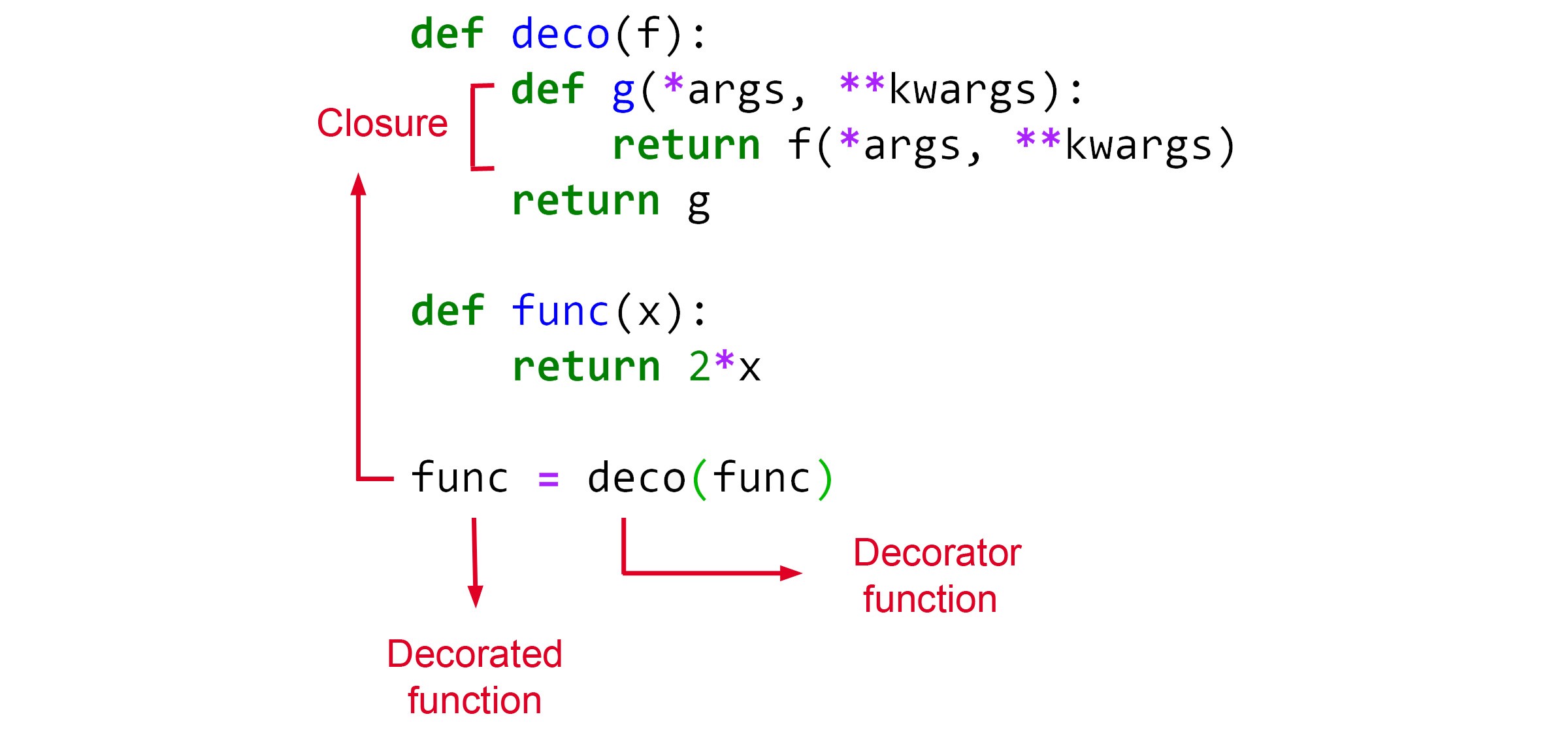
이런 형태 중, inner function을 return 값으로 반환시켜주는 경우를 closure, 클로져라고 한다.
1
2
3
4
5
6
7
def print_msg(msg):
    def printer():
        print(msg)
    return printer

another = print_msg("Hello, Python")  # inner function printer를 another에 할당한다.
another() # Hello, Python
위의 코드에서, 마지막 줄의 another()은 따로 "Hello, python"이라는 string을 argument로 넘겨받지 않았는데도 Hello, Python을 출력한다. 이는 함수가 선언된 시점에 주변 환경 값을 저장하는 특성이 있기 때문에 내부 함수가 전달받지 않은 외부 함수의 변수를 사용할 수 있게 된다.
참조: 파이썬-closure
Closure를 사용하는 이유는, 비슷한 목적을 가진 다양한 함수를 만들어내기 위함이다. 하나의 외부 함수 내부에 여러 내부 함수를 만들어, arg에 따라 다른 내부 함수를 호출하고자 할때 사용할 수 있다.
이러한 복잡한 클로저 함수를 간단하게 만드는 방법으로 decorator를 사용할 수도 있다.
1
2
3
4
5
6
7
8
9
10
11
12
13
14
15
16
17
def star(func):
    def inner(*args, **kwargs):
        print(args[0] * 30)
        func(*args, **kwargs)   # 파라미터로 받은 printer 함수를 호출
        print(args[0] * 30)
    return inner

@star   # printer라는 함수가 star의 매개변수로 들어감
def printer(msg):
    print(msg)

printer("Hello")

'''
******************************
Hello
******************************
이 때, decorator 자체에도 parameter 값을 넣을 수 있다.
1
2
3
4
5
6
7
8
9
10
11
12
13
def generate_power(exponent):
    def wrapper(f):
        def inner(*args):   # *args는 원래 함수 f(raise_two)의 파라미터들을 받는다.
            result = f(*args)
            return exponent**result
        return inner
    return wrapper

@generate_power(2) # decorator의 arg 2는 exponent 파라미터에 전달
def raise_two(n):   # raise_two 함수는 wrapper 함수의 파라미터 f에 전달, argument n은 inner 함수에 arg로 전달
    return n**2

print(raise_two(7))  # 562949953421312
결과값 설명
exponent는 2이고f는 raise_two 함수를 수행,*args는 7이다.- result값은
raise_two(7)의 리턴값으로 49이다. - 최종적으로 리턴된 값
exponent**result는 $2^{49}$의 결과이다.
참조: 파이썬 데코레이터
이 글은 비밀번호로 보호되어 있습니다.