[BoostCamp AI Tech / Product Serving] Fast API(2)
FastAPI 고급 기능과 확장 기능에 대한 내용을 정리한 포스트입니다.
Pydantic
FastAPI는 기본적으로 Data Model 클래스로 Pydantic을 사용하고 있다.
- Data Validation / Settings Management 라이브러리
- Type Hint를 런타임에서 강제해 안전하게 데이터 핸들링
- 파이썬 기본 타입(String, Int 등) + List, Dict, Tuple에 대한 Validation 지원
- 기존 Validation 라이브러리보다 빠름 (Benchmark)
- 머신러닝
Feature Data Validation으로도 활용 가능- ex. Feature A는 Int 타입이고 0~100 사이
Pydantic 의 대표적인 기능으로 2가지가 있다.
- Validation
- Config 관리
Validation
Online Serving에서 유입되는 입력 데이터의 유효성(Validation)을 체크하는 절차를 말한다.
Validation Check logic은 다음과 같다.
- 조건 1: 올바른 url을 입력 받음 (url)
- 조건 2: 1-10 사이의 정수 입력 받음 (rate)
- 조건 3: 올바른 폴더 이름을 입력 받음(target_dir)
Validation을 할 때 사용할 수 있는 여러 방법이 있다.
- 일반 Python Class를 활용
- Dataclass(python 3.7 이상) 활용
- Pydantic 활용
가장 간단하게 사용할 수 있는 방법이 바로 Pydantic을 이용하는 것이다.
1
2
3
4
5
6
from pydantic import BaseModel, HttpUrl, Field, DirectoryPath

class ModelInput(BaseModel):
    url: HttpUrl
    rate: int = Field(ge=1, le=10)
    target_dir: DirectoryPath
Pydantic의 장점은 다음과 같다.
- 훨씬 간결해진 코드 (6라인)(vs 52라인 Python Class, vs 50라인 dataclass)
- 주로 쓰이는 타입들(http url, db url, enum 등)에 대한 Validation이 만들어져 있음
- 런타임에서 Type Hint에 따라서 Validation Error 발생
- Custom Type에 대한 Validation도 쉽게 사용 가능
참고: Custom Types
Config
Config는 앱을 기동하기 위해, 사용자가 설정해야하는 일련의 정보를 담고 있는 것으로 대표적으로 DB 정보를 예로 들 수 있다.
보통 이런 Config들은 하나의 모듈이나 클래스로 관리해서, 사용자가 보기 쉽게 저장한다.
Config를 관리하는 여러가지 방법이 존재한다.
- 코드 내 상수로 관리
- 가장 간단하지만, 보안 정보(Secret)들이 코드에 그대로 노출 → 이슈
- 배포 환경(보통 개발/운영을 분리)에 따라 값을 다르게 줄 수 없음
- yaml 등과 같은 파일로 관리
- 배포 환경 별로 파일을 생성 (dev_config.yaml, prod_config.yaml)
- 보안 정보가 여전히 파일에 노출되므로, 배포 환경 별로 파일이 노출되지 않게 관리 필요
- 환경 변수(+Pydantic.BaseSettings)로 관리
- Validation처럼 Pydantic은 BaseSettings를 상속한 클래스에서 Type Hint로 주입된 설정 데이터를 검증할 수 있음
- Field 클래스의 env 인자 : 환경 변수를 해당 필드로 오버라이딩
- yaml, ini 파일들을 추가적으로 만들지 않고, .env 파일들을 환경별로 만들어 두거나, 실행 환경에서 유연하게 오버라이딩
- 보통 환경 변수는 배포할 때 주입
- 코드나 파일에 보안 정보가 노출되지 않음
FastAPI 확장 기능
FastAPI에는 여러가지 확장 기능이 있다.
Lifespan function
FastAPI 앱을 실행할 때와 종료할 때, 로직을 넣고 싶은 경우
- ex.FastAPI 앱이 처음 실행될 때, 머신러닝 모델을 Load하고 앱을 종료할 때 연결해두었던 Database Connection을 정리
1
2
3
4
5
6
7
8
9
10
11
12
13
14
15
16
17
18
19
20
21
22
23
24
25
26
from contextlib import asynccontextmanager

from fastapi import FastAPI


def fake_answer_to_everything_ml_model(x: float):
    return x * 42


ml_models = {}


@asynccontextmanager
async def lifespan(app: FastAPI):
    # Load the ML model
    ml_models["answer_to_everything"] = fake_answer_to_everything_ml_model
    yield
    # Clean up the ML models and release the resources
    ml_models.clear()

app = FastAPI(lifespan=lifespan)

@app.get("/predict")
async def predict(x: float):
    result = ml_models["answer_to_everything"](x)
    return {"result": result}
async def lifespan(app: FastAPI) 를 사용한는 방법은 다음과 같다.
- yield 를 기점으로
- yield 이전 라인은 앱 시작 전
- yield 이후 라인은 앱 종료 전
- FastAPI 인스턴스 생성 시 lifespan 파라미터에 위 함수를 전달
FastAPI(lifespan=lifespan)
이 기능을 사용하면 실행시 Start Up Event, ctrl+c로 끄면 Shutdown Event!가 출력된다.
API Router
API 엔드포인트가 점점 많아져서, @app.get, @app.post와 같은 코드를 하나의 모듈에서 관리하기가 어려워질 수 있다.
이 때, 사용하는 기능이 바로 API Router 이다. API Router는 큰 애플리케이션들에서 많이 사용되는 기능으로 아래와 같이 사용한다.
- API Endpoint를 정의
- Mini FastAPI로 여러 API를 연결해서 활용한다.
- 기존에 사용하던 @app.get, @app.post을 사용하지 않고, router 파일을 따로 설정하고 app에 import해서 사용
1
2
3
4
5
6
7
8
9
10
11
12
13
14
15
16
17
18
19
20
21
22
23
24
25
26
27
28
29
30
31
32
33
34
35
36
37
38
39
from fastapi import FastAPI, APIRouter
import uvicorn

user_router = APIRouter(prefix="/users")
order_router = APIRouter(prefix="/orders")


@user_router.get("/", tags=["users"])   # /users
def read_users():
    return [{"username": "Rick"}, {"username": "Morty"}]

@user_router.get("/me", tags=["users"]) # /users/me
def read_user_me():
    return {"username": "fakecurrentuser"}

@user_router.get("/{username}", tags=["users"]) # /users/{username}
def read_user(username: str):
    return {"username": username}


@order_router.get("/", tags=["orders"]) # /orders
def read_orders():
    return [{"order": "Taco"}, {"order": "Burritto"}]

@order_router.get("/me", tags=["orders"])   # /orders/me
def read_order_me():
    return {"my_order": "taco"}

@order_router.get("/{order_id}", tags=["orders"])   # /orders/{order_id}
def read_order_id(order_id: str):
    return {"order_id": order_id}


app = FastAPI()

if __name__ == '__main__':
    app.include_router(user_router)
    app.include_router(order_router)
    uvicorn.run(app, host="0.0.0.0", port=8000)
위에서는 두 라우터를 하나의 코드로 만들었지만, 실제에서는 두 파일로 분리해서 만들 수 있다.
Project structure
코드가 점점 커짐에 따라, 프로젝트 구조는 어떻게 잡는게 좋을까?
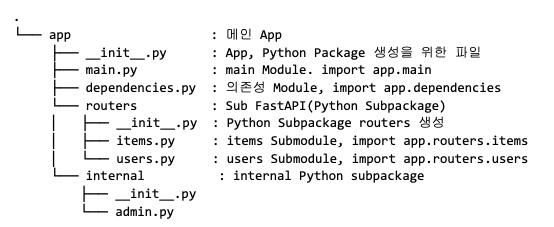
위처럼 프로젝트 구조를 잡을 수 있다.
참고: Cookiecutter
Error Handler
- Error Handling은 웹 서버를 안정적으로 운영하기 위해 반드시 필요한 주제
- 서버에서 Error가 발생한 경우, 어떤 Error가 발생했는지 알아야 하고 요청한 클라이언트에 해당 정보를 전달해 대응할 수 있어야 함
- 서버 개발자는 모니터링 도구를 사용해 Error Log를 수집해야 함
- 발생하고 있는 오류를 빠르게 수정할 수 있도록 예외 처리를 잘 만들 필요가 있음
1
2
3
4
5
6
7
8
9
10
11
12
13
14
15
16
17
18
19
20
21
22
23
24
25
26
from fastapi import FastAPI, HTTPException
import uvicorn

app = FastAPI()

items = {
    1: "Boostcamp",
    2: "AI",
    3: "Tech"
}

@app.get("/v1/{item_id}")
async def find_by_id(item_id: int):
    return items[item_id]

@app.get("/v2/{item_id}")
async def find_by_id(item_id: int):
    try:
        item = items[item_id]
    except KeyError:
        raise HTTPException(status_code=404, detail=f"아이템을 찾을 수 없습니다 [id: {item_id}]")
    return item


if __name__ == '__main__':
    uvicorn.run(app, host="0.0.0.0", port=8000)
위의 코드는 HTTPException을 활용해 Error Handler를 구현한 코드이다.
- FastAPI의 HTTPException은 Error Response를 더 쉽게 보낼 수 있도록 하는 Class
- HTTPException을 이용해서 클라이언트에게 더 자세한 에러 메시지를 보내는 코드 작성
Background Task
일부 오래 걸리는 API 엔드포인트는 클라이언트에게 비동기(asynchronous)로 처리하도록 하고 싶은 경우에 Background Task를 사용할 수 있다.
Background Task를 사용하는 경우는 다음과 같다.
- FastAPI의 기능 중 Background Tasks 기능은 오래 걸리는 작업들을 background에서 실행함
- Online Serving에서 CPU 사용이 많은 작업들을 Background Task로 사용하면, 클라이언트는 작업 완료를 기다리지 않고 즉시 Response를 받아볼 수 있음
- ex. 특정 작업 후, 이메일 전송하는 Task 등
1
2
3
4
5
6
7
8
9
10
11
12
# background tasks
app_2 = FastAPI()

@app_2.post("/task", status_code=202)  # 비동기 작업이 등록됐을 때, HTTP Response 202 (Accepted)를 보통 리턴합니다. https://developer.mozilla.org/en-US/docs/Web/HTTP/Status/202
async def create_task_in_background(task_input: TaskInput, background_tasks: BackgroundTasks):
    background_tasks.add_task(cpu_bound_task, task_input.wait_time)
    return "ok"

start_time = datetime.now()
run_tasks_in_fastapi(app_2, tasks)
end_time = datetime.now()
print(f"Background Tasks: Took {(end_time - start_time).seconds}")
Background Tasks를 사용하지 않는 작업들은 작업 시간 만큼 응답을 기다려야 한다.
하지만, Background Tasks를 사용한 작업들은 기다리지 않고 바로 응답을 주기 때문에 0초 소요되며 실제 작업은 Background에서 실행된다.
만약 작업 결과물을 조회하고 싶을 떄는 Task를 어딘가에 저장해두고, GET 요청을 통해 Task가 완료됐는지 확인할 수 있다.
1
2
3
4
5
6
7
8
9
10
11
12
13
14
15
16
17
18
19
20
21
22
23
24
25
26
27
from uuid import UUID, uuid4

app_3 = FastAPI()

class TaskInput2(BaseModel):
    id_: UUID = Field(default_factory=uuid4)
    wait_time: int

task_repo = {}

def cpu_bound_task_2(id_: UUID, wait_time: int):
    sleep(wait_time)
    result = f"task done after {wait_time}"
    task_repo[id_] = result

@app_3.post("/task", status_code=202)
async def create_task_in_background_2(task_input: TaskInput2, background_tasks: BackgroundTasks):
    background_tasks.add_task(cpu_bound_task_2, id_=task_input.id_, wait_time=task_input.wait_time)
    return task_input.id_

# task 결과물 조회
@app_3.get("/task/{task_id}")
def get_task_result(task_id: UUID):
    try:
        return task_repo[task_id]
    except KeyError:
        return None
이 글은 비밀번호로 보호되어 있습니다.