[BoostCamp AI Tech / Pre-Course 2] Pytorch 구조 학습하기
네이버 부스트코스의 Pre-course 강의를 기반으로 작성한 포스트입니다.
AutoGrad & Optimizer
모델을 구현할 때 Layer 또는 Block을 구현하하고 이렇게 만들어진 블록을 연속적으로 연결하는 방식으로 모델을 구현한다.
torch.nn.Module
위의 블록을 구현하기 위한 기본적인 클래스는 nn.Module이다.
딥러닝을 구성하는 Layer의 base class로 기본적으로 nn.Module이 정의하는 것은 Input, Output, Forward, Backward(weights를 미분)를 정의한다.
학습의 대상인 weights를 parameter(tensor)라고 정의한다.
nn.Parameter
학습이 되는 weights를 파라미터로 정의한다.
Tensor 객체의 상속 객체로 nn.Module 내에 attribute가 될 때는 required_grad=True로 지정되어 학습 대상이 되는 Tensor이다.
즉, AutoGrad(자동미분)의 대상이 된다.
대부분의 layer에 weights 값들이 지정되어 있기 때문에 직접 nn.Parameter을 사용하여 지정할 일은 잘 없다.
1
2
3
4
5
6
7
8
9
10
11
12
class MyLinear(nn.Module):
    def __init__(self, in_features, out_features, bias=True):
        super().__init__()
        self.in_features = in_features
        self.out_features = out_features
        self.weights = nn.Parameter(
            torch.randn(in_features, out_features)
        )
        self.bias = nn.Parameter(torch.randn(out_features))

    def forward(self, x: Tensor):
        return x @ self.weights + self.bias
Backward
Layer에 있는 parameter들의 미분을 수행하는 과정을 말한다.
Forward의 결과값(model의 output=pred)과 실제값 간의 차이(Loss)을 이용하여 Loss값이 작아지는 Parameter로 업데이트하는 과정을 거친다.
1
2
3
4
5
6
7
8
9
10
11
12
13
14
15
16
17
for epoch in range(epochs):

    # gradient을 초기화(이전의 gradient 값이 현재에 영향을 주는 것을 방지
    optimizer.zero_grad()

    # model의 예측값
    outputs = model(inputs)

    # 손실값(실제값 - 예측값)
    loss = criterion(outputs, labels)
    print(loss)

    # loss를 통해 weight 값 구하는 과정
    loss.backward()

    # weight 값을 업데이드
    optimizer.step()
실제 backward는 Module 단계에서 직접 지정이 가능하지만 AutoGrad가 수행해주기 때문에 할 필요가 없다.
- 순서는 이해할 필요가 있다.
1
2
3
4
5
6
7
8
9
10
11
12
13
14
15
16
17
18
19
20
21
22
23
24
25
class LR(nn.Module):
    def __init__(self, dim, lr=torch.scalar_tensor(0.01)):
        super(LR, self).__init__()

        self.w = torch.zeros(dim, 1, dtype=torch.float).to(device)
        self.h = torch.scalar_tensor(0).to(device)
        self.grads = {"dw": torch.zeros(dim, 1, dtype=torch.float).to(device),
                    "db": torch.scalar_tensor(0).to(device)}
        self.lr = lr.to(device)

    def forward(self, x):
        z = torch.mm(self.w.T, x)
        a = self.softmax(z)
        return a

    def sigmoid(self, z):
        return 1 / (1 + torch.exp(-z))

    def backward(self, x, yhat, y):
        self.grads["dw"] = (1/x.shape[1]) * torch.mm(x, (yhat-y).T)
        self.grads["db"] = (1/x.shape[1]) * torch.sum(yhat - y)

    def optimizer(self):
        self.w = self.w - self.lr * self.grads["dw"]
        self.b = self.b - self.lr * self.grads["db"]
Pytorch Dataset & DataLoader
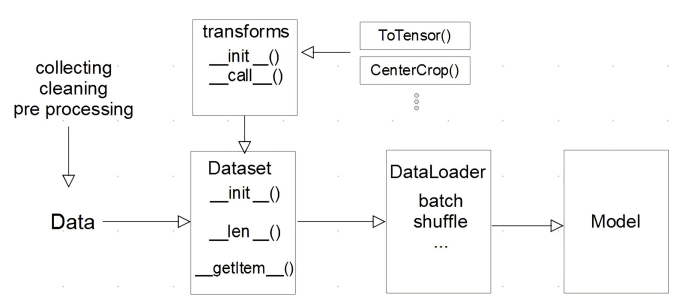
모델에 데이터를 입력하는 과정은 아래와 같이 표현할 수 있다.
Dataset 클래스
데이터 입력 형태를 정의하는 클래스로 데이터를 입력하는 방식의 표준화한다.
Image, Text, Audio 등에 따른 다른 형식의 입력을 정의한다.
1
2
3
4
5
6
7
8
9
10
11
12
13
14
15
16
import torch
from torch.utils.data import Dataset

class CustomDataset(Dataset):
    def __init__(self, text, labels):
        self.labels = labels    # 초기 데이터 생성 방법을 지정
        self.data = text

    def __len__(self):
        return len(self.labels)

    def __getitem__(self, idx):
        label = self.labels[idx]    # index 값을 주었을 때 반환되는 데이터의 형태 (X, y)
        text = self.data[idx]
        sample = {"Text": text, "Class": label}
        return sample
Dataset 클래스를 생성할 때 주의해야할 점이 있다.
- 데이터 형태에 따라 각 함수를 다르게 정의
- 모든 것을 데이터 생성 시점에 처리할 필요는 없음
- image의 Tensor 변화는 학습에 필요한 시점에 반환
- 데이터 셋에 대한 표준화된 처리방법 제공 필요
- 후속 연구자 또는 동료에게 도움이 됨
- 최근에는 HuggingFace 등 표준화된 라이브러리 사용
DataLoader 클래스
DataLoader는 Data의 Batch를 생성해주는 클래스로 학습 직전(GPU feed 전) 데이터의 변환하는 일을 한다.
Tensor로 변환하고 Batch 처리가 메인 업무로 병렬적인 데이터 전처리 코드의 고민이 필요하다.
1
2
3
4
5
6
7
8
9
10
11
12
13
text = ['Happy', 'Amazing', 'Sad', 'Unhappy', 'Glum']
labels = ['Positive', 'Positive', 'Negative', 'Negative', 'Negative']
MyDataset = CustomDataset(text, labels)     # Dataset 생성

MyDataLoader = DataLoader(MyDataset, batch_size=2, shuffle=True)    # DataLoader Generator
next(iter(MyDataLoader))
# {'Text': ['Glum','Sad'], 'Class': ['Nevative', 'Negative']}

for dataset in DataLoader:
    print(dataset)
# {'Text': ['Glum','Unhappy'], 'Class': ['Nevative', 'Negative']}
# {'Text': ['Sad','Amazing'], 'Class': ['Nevative', 'Positive']}
# {'Text': ['happy'], 'Class': ['Positive']}
1
2
3
4
5
DataLoader(dataset, batch_size=1, shuffle=False, sampler=None,
           batch_sampler=None, num_workers=0, collate_fn=None,
           pin_memory=False, drop_last=False, timeout=0,
           worker_init_fn=None, *, prefetch_factor=2,
           persistent_workers=False)
모델 불러오기
학습 결과를 공유하거나 학습 결과를 저장을 해야할 때가 있다. 이럴 때는 모델을 저장해야한다.
model.save()
학습의 결과를 저장하기 위한 함수로 2가지의 저장하는 방식이 있다.
- 모델 형태(architecture) 전체
- 모델의 파라미터만 저장
이 과정을 통해 모델 학습 중간 과정의 저장을 통해 최선의 결과 모델을 선택하고 만들어진 모델을 외부 연구자와 공유하여 학습 재연성을 향상시킬 수 있다.
1
2
3
4
5
6
7
8
9
10
11
12
print("Model's state_dict")
for param_tensor in model.state_dict(): # 모델의 파라미터를 표시
    print(param_tensor, "\t", model.state_dict()[param_tensor].size())

torch.save(model.state_dict(), os.path.join(MODEL_PATH, "model.pt"))    # 모델의 파라미터를 저장

new_model = TheModelClass() # 같은 모델의 형태에서 파라미터만 load

new_model.load_state_dict(torch.load(os.path.join(MODEL_PATH, "model.pt")))

torch.save(model, os.path.join(MODEL_PATH, "model.pt"))
model = torch.load(os.path.join(MODEL_PATH, "model.pt"))
checkpoints
checkpoints는 학습의 중간 결과를 저장하여 최선의 결과를 선택한다. 이 때 earlystopping 기법을 사용하여 이전 학습의 결과물을 저장하고 loss와 metric 값을 지속적으로 확인 및 저장한다.
일반적으로 epoch, loss, metric을 함께 저장하여 확인한다.
1
2
3
4
5
6
7
8
9
10
11
12
13
torch.save({    # 모델의 정보를 epoch과 함께 저장
    "epoch": e,
    "model_state_dict": model.state_dict(),
    "optimizer_state_dict": optimizer.state_dict(),
    "loss": epoch_loss
},
f"saved/checkpoint_model_{e}_{epoch_loss/len(dataloader)}_{epoch_acc/len(dataloader)}.pt")

checkpoint = torch.load(PATH)
model.load_state_dict(checkpoint['model_state_dict'])
optimizer.load_state_dict(checkpoin['optimizer_state_dict'])
epoch = checkpoint['epoch']
loss = checkpoint['loss']
pretrained model Transfer learning
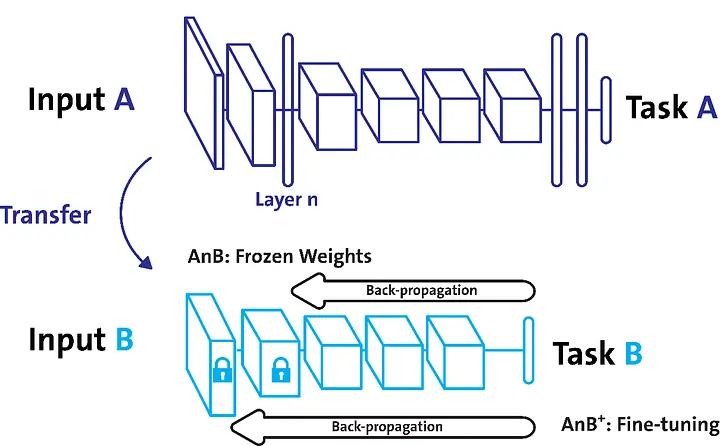
다른 사람의 모델을 쓰고 싶은 경우도 있다. 이런 경우 다른 데이터셋으로 만든 모델을 현재 데이터에 적용하여 모델을 학습시킬 수 있다.
일반적으로 대용량 데이터셋으로 만들어진 모델의 성능이 우수하다. 이러한 이유로 현재 Deep Learning에서는 가장 일반적인 학습 기법이다.
이 때, backbone architecture가 잘 학습된 모델에서 일부분만 변경하여 학습을 수행한다.
- CV: TorchVision은 다양한 기본 모델을 제공
- NLP: HuggingFace가 사실상 표준
Freezing
Freezing 기법은 pretrained model을 활용할 때 모델의 일부분을 frozen 시키는 기법이다.
1
2
3
4
5
6
7
8
9
10
11
12
13
14
15
16
17
18
19
20
21
22
23
24
25
26
from torch import nn
from torchvision import models

class MyNewNet(nn.Module):
    def __init__(self):
        super(MyNewNet, self).__init__()
        self.vgg19 = models.vgg19(pretrained=True)
        self.linear_layers = nn.Linear(1000, 1)

    # Defining the forward pass
    def forward(self, x):
        x = self.vgg19(x)
        return self.linear_layers(x)

device = torch.device("cuda" if torch.cuda.is_available() else "cpu")

my_model = MyNewNet()
my_model = my_model.to(device)

# 모델의 모든 파라미터를 Frozen
for param in my_model.parameters():
    param.requires_grad = False

# 선형 층의 파라미터만 학습 가능하도록 설정
for param in my_model.linear_layers.parameters():
    param.requires_grad = True
Monitoring tools for Pytorch
긴 학습 시간 동안 모델에 대한 기록을 하는 도구가 있다.
대표적인 도구는 Tensorboard와 weight & biases다.
Tensorboard
TensorFlow의 프로젝트로 만들어진 시각화 도구로 학습 그래프, metric, 학습 결과의 시각화를 지원한다.
TensorFlow 뿐 만 아니라 Pytorch도 연결이 가능하다.
- scalar: metric 등 상수 값의 연속(epoch)을 표시
- graph: 모델의 computational graph 표시
- histogram: weight 등 값의 분포를 표현
- Image: 예측 값과 실제 값을 비교 표시
- mesh: 3d 형태의 데이터를 표현하는 도구
1
2
3
4
5
6
7
8
9
10
11
12
13
14
15
16
17
18
19
20
import os
logs_base_dir = "logs" # Tensorboard 기록을 위한 dictionary 생성
os.makedirs(logs_base_dir, exist_ok=True)

from torch.utils.tensorboard import SummaryWriter   # 기록 생성 객체 SummaryWriter 생성
import numpy as np

writer = SummaryWriter(logs_base_dir)
for n_iter in range(100):
    # add_scalar 함수: scalar 값을 기록
    writer.add_scalar("Loss/train", np.random.random(), n_iter) # Loss/train: loss category에 train 값, n_iter: x 축의 값
    writer.add_scalar("Loss/test", np.random.random(), n_iter)
    writer.add_scalar("Accuracy/train", np.random.random(), n_iter)
    writer.add_scalar("Accuracy/test", np.random.random(), n_iter)
writer.flush()  # 값 기록

# jupyter 상에서 tensorboard 수행 - 파일 위치 지정(logs_base_dir)
# 같은 명령어를 콘솔에서도 사용 가능
%load_ext tensorboard
%tensorboard --logdir {logs_base_dir}
weight & biases
머신러닝 실험을 원활히 지원하기 위한 상용 도구로 협업, code versioning, 실험 결과 기록 등을 제공한다.
MLOps의 대표적인 툴로 저변 확대 중인 도구이다.
- 가입 후 API 키 확인
- 새로운 프로젝트 생성하기
1
2
3
4
5
6
7
8
9
10
11
12
13
14
15
16
17
18
19
20
!pip install wandb -q

# config 설정
config = {"epochs": EPOCHS, "batch_size": BATCH_SIZE, "learning_rate": LEARNING_RATE}
wandb.init(project="my-test-project", config=config)

wandb.config.batch_size=BATCH_SIZE
wandb.config.learning_rate = LEARNING_RATE

for e in range(1, EPOCHS + 1):
    epoch_loss = 0
    epoch_acc = 0
    for X_batch, y_batch in train_dataset:
        X_batch, y_batch = X_batch.to(device), y_batch.to(device).type(torch.cuda.FloatTensor)
        # ...
        optimizer.step()

        # ...

    wandb.log({"accuracy": train_acc, "loss": train_loss})
이 글은 비밀번호로 보호되어 있습니다.